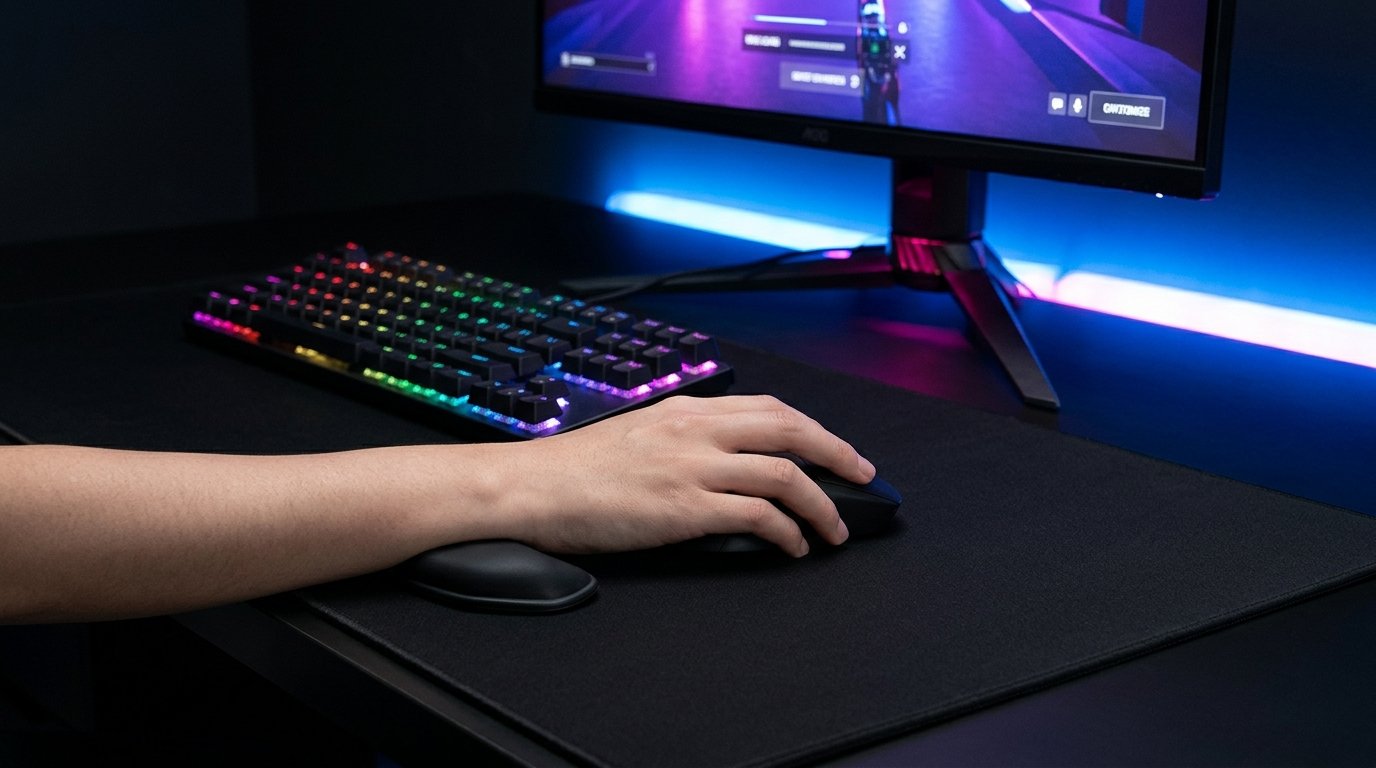
Badseed Tech Carpio is a special edition of the Carpio 2.0 ergonomic wrist rest developed through a collaboration between BadSeed Tech and DeltaHub. Designed for people who spend long hours using a computer mouse, it provides a movable support surface beneath the palm rather than a conventional wrist pad that stays fixed on the desk. Its distinctive styling and practical design make it an interesting option for gamers, programmers, designers, and office workers. However, understanding how it works, what it can realistically offer, and where its limitations lie is essential before deciding whether it suits your setup.
Quick Answer: What Is Badseed Tech Carpio?
Badseed Tech Carpio is a creator-collaboration edition of DeltaHub’s Carpio 2.0 ergonomic mouse wrist rest. It is designed to move with the user’s hand during mouse movements, offering a different experience from traditional stationary wrist supports.
The main points to know are:
- Product type: Ergonomic mouse wrist support.
- Manufacturer: DeltaHub.
- Collaboration: BadSeed Tech.
- Primary purpose: Support the palm during computer mouse use.
- Technology: Mechanical, with no electronic connection required.
- Intended users: Gamers, office workers, programmers, designers, and other frequent mouse users.
- Main consideration: It may suit some users better than others, depending on their grip, desk surface, and preferred working posture.
The special edition uses the established Carpio 2.0 design. Its distinguishing features are primarily its collaboration-specific styling and pads rather than a completely new ergonomic mechanism.
What Is BadSeed Tech?
BadSeed Tech is associated with technology content, particularly computer hardware, gaming peripherals, and desktop accessories.
The name appears in searches for equipment designed to improve a computer setup, including mice, keyboards, audio hardware, and ergonomic accessories. Its collaboration with DeltaHub brought the BadSeed Tech name to a version of the Carpio 2.0 wrist support.
It is important to distinguish between the creator brand and the product manufacturer. DeltaHub is the company behind the Carpio product line, while BadSeed Tech is associated with the special edition.
This distinction helps buyers understand what they are purchasing. The BadSeed Tech Carpio is not an entirely independent product platform; it builds on an existing ergonomic accessory design.
What Is the Carpio 2.0 Wrist Rest?
The Carpio 2.0 is an ergonomic accessory intended for use with a computer mouse. Unlike a conventional foam or gel wrist rest, which remains in one position, the Carpio is designed to glide across the working surface as the user’s hand moves.
This approach addresses a practical issue with stationary supports. During mouse use, your hand moves in several directions, but a fixed wrist pad stays where it is. Depending on the shape and placement of the pad, you may find that your hand loses contact with the support or moves across its surface.
The Carpio design takes a different approach by allowing the support to travel with the hand.
How Does the Moving Support Work?
The device sits beneath the lower part of the palm and uses a gliding mechanism to move across a compatible desk or mouse-pad surface.
For example, imagine editing a video timeline. You move the mouse left to right, return to an earlier section, and then move diagonally to select a clip. A conventional wrist pad remains stationary throughout these movements.
A movable support is intended to accompany your hand instead of forcing you to reposition your palm relative to a fixed cushion.
The same principle may be useful for other tasks, including:
- Moving through large spreadsheets.
- Editing photographs or video.
- Navigating complex design software.
- Playing games that involve frequent mouse movements.
- Working with documents and browser windows for extended periods.
The actual experience depends on the user’s hand position, mouse technique, and working surface.
Key Features of Badseed Tech Carpio
1. Movable Palm Support
The defining feature is its ability to glide with the hand during mouse use.
This distinguishes it from many traditional wrist rests that are designed primarily to provide a stationary cushioning surface.
For people who frequently reposition their mouse, this movement may feel more natural than repeatedly moving their hand on and off a fixed pad.
However, a movable design is not automatically more comfortable for everyone. Some users may prefer a soft, stationary support or may find that they do not need an additional accessory at all.
2. Collaboration-Specific Design
The BadSeed Tech edition combines the Carpio 2.0 platform with distinctive styling associated with the creator collaboration.
This may appeal to users who prefer a darker desktop setup or want their accessories to match their keyboard, mouse, mouse pad, and other equipment.
The visual difference is worth separating from the functional difference. The collaboration does not, by itself, establish that the product has superior ergonomic performance compared with the standard Carpio 2.0.
If functionality is your priority, compare the current product descriptions and prices before paying extra for a particular edition.
3. Compatibility With Different Computer Mice
The accessory is intended to work alongside a computer mouse rather than replace one.
It may therefore fit into different types of setups, including gaming desktops, home offices, and professional workstations.
However, the mouse is only one part of the equation. The available desk space, mouse-pad surface, hand position, and height of the working surface can all influence comfort.
Before purchasing, check the manufacturer’s current guidance on compatible surfaces and product dimensions.
4. No Software or Charging Required
Badseed Tech Carpio is a mechanical desk accessory rather than an electronic device.
It does not require a battery, Bluetooth pairing, a USB connection, or a companion application to perform its basic function.
That makes setup relatively straightforward compared with electronic accessories that require drivers or configuration.
You place it in your working area, position your hand appropriately, and test how it moves with your mouse.
5. Designed for Everyday Computer Use
Although gaming is an obvious use case, the product is not limited to gamers.
Anyone who frequently uses a mouse may be interested in trying a movable palm support, particularly if a stationary wrist rest does not suit their preferred movement pattern.
Potential users include:
- Software developers.
- Graphic designers.
- Video editors.
- Office employees.
- Students.
- Streamers and content creators.
These are potential use cases, not a guarantee that every person in these groups will benefit from the accessory.
Potential Benefits of Badseed Tech Carpio
The value of an ergonomic accessory depends on how well it fits your working habits. Here are several potential benefits worth considering.
A More Consistent Support Position
Because the support moves with the hand, it may help users maintain a more consistent contact point during mouse movements.
Someone who frequently navigates large documents or moves a cursor across multiple monitors may appreciate this design.
Whether it improves comfort will depend on the individual’s technique and workstation arrangement.
A Different Alternative to Traditional Wrist Pads
Conventional wrist pads are stationary, while the Carpio is designed to glide.
That difference provides a clear reason to consider it if a standard gel or foam pad feels restrictive during mouse movement.
On the other hand, users who primarily want cushioning while resting their hands may find a conventional pad more suitable.
A Compact Desktop Accessory
A small wrist support can be easier to accommodate than a large ergonomic platform or a substantial desk attachment.
This may be helpful for users with limited workspace, provided the accessory fits comfortably alongside their mouse and mouse pad.
Check the manufacturer’s current dimensions before buying, especially if your desk is narrow or your mouse movements require a large area.
A Potential Addition to a Gaming Setup
Gaming involves different movement patterns depending on the title and player.
A competitive first-person shooter, for example, may require large, rapid mouse movements. Strategy games and simulation titles may involve more controlled movements and frequent clicking.
A movable palm support may appeal to some players, but it should not be assumed to improve reaction time, aim, or competitive performance without reliable evidence.
Its primary purpose is ergonomic support, not increasing a mouse’s technical capabilities.
Limitations to Consider Before Buying
A balanced product assessment should consider the drawbacks as well as the benefits.
It May Take Time to Get Used To
If you have always used a conventional mouse pad without wrist support, a moving accessory may feel unfamiliar.
You may need time to determine how to position your hand and whether the support works naturally with your preferred grip.
If the movement feels distracting or uncomfortable, forcing yourself to use it is unlikely to be helpful.
It Cannot Correct Every Ergonomic Problem
Wrist discomfort can be influenced by desk height, mouse placement, repetitive movement, posture, workload, and other factors.
A wrist rest alone cannot correct all these issues.
The US Occupational Safety and Health Administration recommends maintaining a neutral wrist position and arranging the workstation to reduce awkward postures. It also notes that wrist or palm supports should be used appropriately as part of a coordinated workstation setup.
Consequently, buying an accessory should not replace evaluating your desk, chair, mouse position, and working habits.
It Is Not a Medical Treatment
It is important not to confuse ergonomic equipment with medical treatment.
There is insufficient evidence in the sources reviewed here to conclude that the BadSeed Tech edition treats or cures carpal tunnel syndrome, tendon disorders, or other diagnosed conditions.
If you experience persistent pain, numbness, tingling, or weakness, seek advice from a qualified healthcare professional instead of relying on a wrist rest alone.
Value Depends on Your Needs
The special edition’s styling may appeal to fans of BadSeed Tech, but appearance does not necessarily translate into better functionality.
Compare its current price with the standard Carpio 2.0 and other wrist supports. Consider whether the collaboration-specific design justifies any price difference for you.
A more expensive accessory is not automatically the best choice for every workstation.
Badseed Tech Carpio vs. a Traditional Wrist Rest
The main difference is how the support behaves when you move your mouse.
| Feature | BadSeed Tech Carpio | Traditional wrist rest |
|---|---|---|
| Movement | Designed to glide with the hand | Usually stationary |
| Typical design | Compact movable support | Foam, gel, or padded support |
| Main purpose | Support during mouse movement | Cushioning or support near the wrist or palm |
| Setup | Position beside the mouse | Position near the mouse or keyboard |
| Comfort | Depends on individual preference | Depends on shape, height, and material |
| Best choice | Users who prefer a movable support | Users who prefer a fixed support surface |
Neither design is universally better.
A person who makes frequent, wide mouse movements may prefer a movable support. Someone who values cushioning or does not like a gliding accessory may prefer a conventional wrist rest.
The most useful comparison is how each option fits your own posture and tasks, rather than which product has the more impressive marketing.
How to Use Badseed Tech Carpio in Your Workspace
If you decide to try the accessory, follow a few practical steps to assess whether it suits your setup.
Step 1: Position Your Mouse Correctly
Place the mouse close enough to your body that you do not need to reach forward or sideways excessively.
Keep your elbow near your body and your shoulder relaxed. Your wrist should remain as straight and neutral as reasonably possible during use.
Step 2: Place the Support Beneath the Appropriate Part of Your Hand
Follow the manufacturer’s instructions for positioning the accessory.
The goal is to support the lower palm appropriately without forcing your wrist into an awkward angle or placing unnecessary pressure on sensitive areas.
Step 3: Check the Surface
Make sure the support moves smoothly across the surface recommended by the manufacturer.
If it catches, tilts, or feels unstable, review the surface compatibility and positioning instructions before continuing to use it.
Step 4: Test Your Normal Tasks
Use the accessory during familiar activities, such as browsing, editing documents, or navigating a design application.
Pay attention to whether your hand moves comfortably and whether the support feels natural.
Avoid assuming that a brief first impression predicts how comfortable it will be over an entire working day.
Step 5: Reassess Your Setup
If the accessory does not improve your experience, examine your mouse height, chair position, desk arrangement, and work habits.
The OSHA workstation guidance recommends keeping the wrists aligned with the forearms, avoiding awkward postures, and changing positions regularly rather than remaining still for prolonged periods.
Is Badseed Tech Carpio Worth Buying?
Badseed Tech Carpio may be worth considering if you want a movable palm support and prefer the design of the BadSeed Tech edition.
Its strongest selling point is its approach to mouse support. Instead of relying on a fixed cushion, it is designed to travel with the user’s hand.
However, its value depends on your personal preferences, workstation, and budget.
It May Suit You If:
- You use a mouse for extended periods.
- You prefer a support that moves with your hand.
- You want a compact accessory for your desktop.
- You like the collaboration’s styling.
- You are comfortable comparing ergonomic accessories before purchasing.
You May Prefer an Alternative If:
- You prefer soft, stationary cushioning.
- You find movable supports distracting.
- Your current setup is already comfortable.
- You need a medical assessment for persistent wrist symptoms.
- The special edition costs more than you are willing to pay for its design differences.
Before buying, confirm the current price, size options, handedness, shipping costs, return policy, and warranty directly with the seller.
Verdict: Badseed Tech Carpio is an interesting alternative to a traditional mouse wrist rest, but its suitability depends on the user. Treat it as a workstation accessory to evaluate—not a guaranteed solution to wrist discomfort.
Frequently Asked Questions
1. What is Badseed Tech Carpio?
Badseed Tech Carpio is a special edition of DeltaHub’s Carpio 2.0 ergonomic mouse wrist rest, created through a collaboration with BadSeed Tech. It is designed to glide with the user’s hand during mouse movements.
2. Who makes Badseed Tech Carpio?
DeltaHub is the company behind the Carpio product line. BadSeed Tech is associated with the special-edition collaboration and its distinctive styling.
3. Is Badseed Tech Carpio an electronic gadget?
No. It is a mechanical accessory that does not require a battery, USB connection, Bluetooth pairing, or software installation to perform its basic function.
4. Can Badseed Tech Carpio cure carpal tunnel syndrome?
It should not be considered a cure or treatment for carpal tunnel syndrome. Although ergonomic accessories may affect comfort and wrist positioning, persistent symptoms require appropriate medical evaluation.
5. Is Badseed Tech Carpio better than a normal wrist rest?
Not for everyone. Its movable design may appeal to users who want support that travels with their hand, while others may prefer the cushioning and simplicity of a stationary wrist rest.
Conclusion
Badseed Tech Carpio combines the established Carpio 2.0 design with a collaboration-specific appearance for users interested in ergonomic desktop accessories. Its movable support distinguishes it from traditional stationary wrist rests, making it an option worth exploring for gaming, office work, and other mouse-intensive activities.
Still, the accessory is not a substitute for a properly arranged workstation, regular movement, or professional medical advice when symptoms persist. The best choice is the one that suits your hand position, working surface, comfort preferences, and budget.
Ready to upgrade your workspace? Compare the BadSeed Tech edition with the standard Carpio 2.0, review the manufacturer’s current specifications, and choose the option that best fits your everyday computer use.