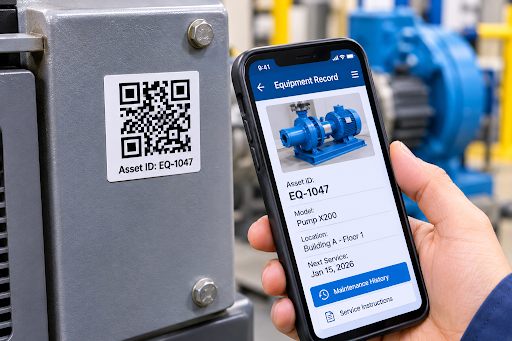
A one-inch square QR label can give a technician quick access to an equipment record, but it should point to a stable asset ID or durable web address rather than a document that may move or disappear. The label must scan on the actual equipment, with the phones or scanners used by the maintenance team, after ordinary cleaning and handling. A QR code is a doorway to the record; it does not prove that a service was completed or that the equipment is safe to operate.
Decide what the scan should open
Choose one destination that remains useful over time. A controlled equipment page can show the asset ID, current location, model, maintenance schedule, service history, and approved instructions. Avoid printing a QR code that points directly to a file in one employee’s personal cloud folder. If that person leaves or reorganizes the folder, the label becomes useless. A stable internal URL or asset key that redirects through a managed system is easier to maintain.
Define who can access the destination. A technician may need edit rights to record work, while a general employee may only need to view operating instructions. Do not put sensitive credentials, personal details, or confidential service notes in a public QR destination. If the system requires login, test the sign-in flow at the equipment. A code that opens a login screen but never reaches the record will not save time.
The square QR code labels product page describes a one-inch square direct thermal format. Before ordering, confirm the roll configuration and printer support. The small size makes placement convenient, but it also limits the amount of data that can be encoded at a reliably scannable module size.
Keep the QR payload short
Encode a short URL or stable asset identifier instead of a long paragraph. More encoded characters generally make a QR pattern denser. On a one-inch label, dense modules may be too small for the printer to reproduce cleanly or for a phone to resolve under poor lighting. Use a redirect or lookup page when the full destination is long. If the destination changes later, update the redirect rather than replacing every physical label.
Keep the quiet zone around the QR code clear. Avoid a border, logo, or text touching the symbol. If a human-readable asset ID is required, print it outside the quiet zone at a size that can still be read without magnification. Do not assume a one-inch square has enough room for a large code, a long asset name, and several icons. If the record is important and the identifier is long, move to a larger label.
Generate the QR using approved software and print at actual size. Disable fit-to-page or automatic scaling. Inspect the finished dots for gaps, merged modules, and uneven edges. Excess print darkness may make modules grow into each other; insufficient darkness may leave them broken. Test small adjustments one at a time and keep the settings that work with the chosen media.
Place the label where a person can scan it
Choose a flat, visible part of the equipment that does not become dangerously hot, wet, or abrasive. Avoid vents, moving parts, manufacturer warnings, and service access panels that are replaced frequently. A code placed on the back of a heavy machine may be technically present but unusable during routine maintenance. Ask technicians to approach the asset as they normally would and identify a safe scanning point.
Clean and dry the surface before applying the label. Test adhesion on the actual finish, especially powder-coated metal and textured plastic. Curvature can distort a one-inch square, and a loose corner can catch during cleaning. If the equipment is washed down, exposed to solvent, or used outdoors, a paper direct thermal label may not last; select a material designed for that environment after testing.
Place the human-readable asset ID near the code so a failed scan can be resolved by manual lookup. If the label is damaged, search the system using the visible ID or manufacturer serial number, confirm the asset, then print a replacement tied to the same record. Do not create a second record because the sticker failed.
Test the complete user journey
Scan the applied code with at least the oldest phone and the normal scanner in use. Test under typical lighting, from a comfortable distance, and after the asset has been cleaned. Confirm that the correct record opens and that the user can reach the needed action without several unnecessary screens. A QR code that scans but opens a generic home page does not solve the maintenance problem.
Run a small pilot across different equipment types. Track failed scans, time to reach the record, label damage, and reports that the destination is wrong or out of date. Fix the destination and permission structure before labeling hundreds of assets. A small pilot also reveals whether staff actually want a QR scan or whether a short printed asset number is faster in some locations.
Maintain the link and record over time
Assign an owner for the QR destination. When equipment is moved, repaired, or retired, update the system record. Do not change the printed code’s meaning by reassigning an old ID to a new machine. Periodically scan a sample of labels to check both physical readability and digital destination. Monitor broken links and redirect changes as part of maintenance-system administration.
Compare broader direct thermal labels options if a larger code or longer service life is needed. The one-inch square format is successful when the symbol scans on the equipment, opens the right controlled record, and remains readable for the intended interval. If any one of those conditions fails, a different label size, material, or destination design is the appropriate fix.
Make the printed label part of the equipment onboarding checklist. Before an asset enters service, confirm its ID, apply the label, scan it, and verify that the linked record contains the right model and serial number. This catches errors while the equipment is still accessible. A periodic sample audit can then detect later failures without forcing technicians to discover broken links during an urgent repair.