
In a world that’s constantly buzzing with notifications and distractions, finding a moment of peace to reflect on your thoughts can feel like searching for a needle in a haystack. Enter journaling—an age-old practice that has transformed into an essential tool for modern mindfulness. But why stick to pen and paper when you can harness the power of technology? In this digital era, journal apps have emerged as convenient companions that not only streamline your writing process but also enhance your self-reflection journey. Whether you’re looking to track daily moods, document life’s milestones, or simply jot down fleeting thoughts, we’ve rounded up the best journal apps that combine functionality with flair. Say goodbye to cluttered notebooks and hello to seamless digital journaling! Let’s dive into our top picks that will inspire you to put pen (or finger) to screen every day.
Introduction to journaling and the benefits of digital journaling apps
Journaling has long been a powerful tool for self-reflection, creativity, and emotional well-being. Whether you’re chronicling your daily adventures or exploring your innermost thoughts, putting pen to paper can provide clarity and relief. But in our fast-paced digital world, traditional journaling might feel cumbersome. Enter digital journaling apps! These innovative tools not only streamline the writing process but also add exciting features that enhance the experience.
Imagine having a personal diary right at your fingertips—complete with reminders to keep you on track, mood tracking options to help you understand yourself better, and even multimedia support for those days when words just aren’t enough. With so many choices out there, it’s essential to find the perfect app tailored to your needs. So let’s dive into the best journal apps available today that promise an engaging and enriching journaling journey!
Factors to consider when choosing a journal app (daily entries, privacy, reminders, mood tracking, multimedia support, organization, ease of use)
When selecting a journal app, daily entries are crucial. You want an interface that encourages consistent writing without feeling overwhelming.
Privacy is another key factor. Look for apps that offer password protection or encryption to ensure your thoughts remain confidential.
Reminders can keep you on track. An ideal app will allow customizable notifications, nudging you gently when it’s time to jot down your thoughts.
Mood tracking features add depth to your journaling experience. They help identify patterns over time, enhancing self-awareness and emotional growth.
Multimedia support enriches entries through photos, audio recordings, or videos. This versatility lets you express yourself beyond just words.
Consider how the app organizes your content too. Tags and folders can make finding past entries a breeze.
Lastly, ease of use should never be overlooked. A clutter-free design helps maintain focus during those reflective moments.
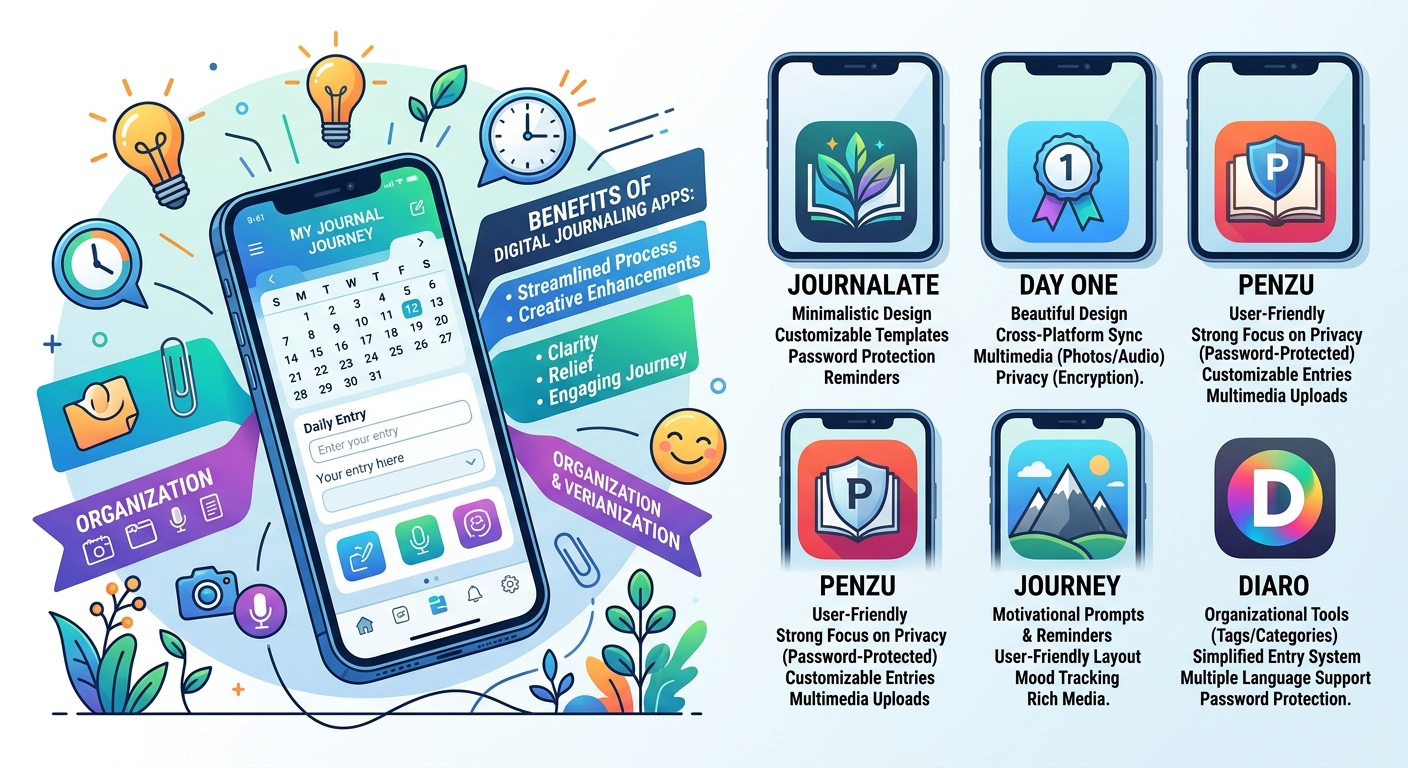
Top 5 journal apps and their features compared (include screenshots or visuals)
Journalate stands out for its simplicity and aesthetic design. Users appreciate the clean interface that makes daily entries feel effortless. It supports multimedia, allowing you to attach photos seamlessly.
Day One leads in versatility with robust features like location tagging and weather data integration. Its premium version offers additional options such as unlimited photo storage, making it perfect for those who love to document every detail.
Penzu is known for its strong focus on privacy. With military-grade encryption, you can write freely without worrying about prying eyes. The app also allows customizable journal covers, adding a personal touch.
Journey thrives on motivation through prompts and reminders. It’s user-friendly with an intuitive layout that encourages regular writing while tracking your mood over time.
Diaro excels at organization with tagging systems and search functionalities. This app helps maintain clarity across multiple journals, ensuring easy access to past entries whenever needed.
– Journalate
Journalate stands out as a user-friendly journaling app designed for quick and effective entries. Its sleek interface encourages users to jot down thoughts, memories, or daily reflections without unnecessary distractions.
One of its notable features is the ability to create customizable templates. This allows you to tailor your journal experience based on your mood or specific prompts. Whether you’re focusing on gratitude, goal-setting, or simply chronicling daily events, Journalate adapts accordingly.
Privacy is prioritized here too. With password protection options and data encryption, you can feel secure about your personal thoughts being safely stored away from prying eyes.
Moreover, reminders help keep consistency in your journaling habit. The gentle nudges encourage users to make writing a part of their routine—a small yet impactful way to foster self-reflection every day.
– Day One
Day One stands out as one of the most popular journal apps available today. Its sleek design and user-friendly interface make it a pleasure to use.
One impressive feature is its ability to sync across multiple devices. Whether you’re on your phone, tablet, or computer, you can access your entries seamlessly. This flexibility ensures that journaling fits into your lifestyle effortlessly.
The app also supports multimedia entries. You can add photos, audio recordings, and even location data to enrich your reflections. This capability transforms simple text into vibrant memories.
Privacy is paramount with Day One. Users benefit from end-to-end encryption for their journals, ensuring that personal thoughts remain secure.
Additionally, the app offers prompts and reminders to keep users engaged in their writing practice daily. These features help cultivate a consistent habit while making journaling feel less daunting.
– Penzu
Penzu stands out with its user-friendly interface and strong focus on privacy. Users can create personal journals that are password-protected, ensuring their thoughts remain secure.
The app offers customizable entries, allowing you to choose from various fonts and backgrounds. This feature adds a personal touch to your journaling experience.
Penzu also supports multimedia uploads. You can easily add photos or audio recordings to enhance your entries, making them more dynamic and memorable.
Another notable aspect is the ability to set reminders for daily writing prompts. This helps keep users engaged and consistent in their journaling habits.
While Penzu’s free version has limitations, the premium subscription unlocks additional features like export options and unlimited journals. It’s ideal for those who value both creativity and confidentiality in their digital journaling journey.
– Journey
Journey stands out with its user-friendly interface and rich feature set. Designed for both casual and dedicated journalers, it offers a seamless way to document daily experiences.
One of Journey’s highlights is its cross-platform accessibility. Whether you’re on your laptop or mobile device, your entries sync effortlessly. This means you can jot down thoughts anytime inspiration strikes.
The app also supports multimedia features like photos and videos, allowing users to capture moments in vivid detail. Mood tracking is another standout aspect; understanding emotions over time adds depth to one’s journaling experience.
Privacy concerns? Journey has you covered with password protection options. Customizable templates make starting each entry feel fresh and unique.
For those who thrive on reminders, the app sends gentle nudges to keep journaling consistent. With these thoughtful touches, Journey truly makes documenting life engaging and enjoyable.
– Diaro
Diaro stands out as a versatile digital journaling app. Its sleek interface makes it easy to navigate for users of all experience levels.
The app supports multiple languages, catering to a diverse audience. You can create daily entries and organize them effortlessly by date or category. This feature is especially helpful if you want to track specific themes like travel, personal growth, or gratitude.
Privacy is paramount with Diaro; it offers password protection for your entries. This ensures that your thoughts remain confidential and secure.
Another notable aspect is the multimedia support. Users can enhance their journals with photos or voice recordings, allowing for richer storytelling.
With customizable reminders, you’ll never miss a chance to jot down your thoughts each day. Whether you’re looking for reflection or creativity, Diaro provides an excellent platform tailored to your needs.
Pros and cons of each app based on the factors mentioned above
Journalate offers a sleek interface and strong multimedia support, allowing users to incorporate images easily. However, it lacks advanced mood tracking features.
Day One is renowned for its beautiful design and cross-platform compatibility. Users enjoy powerful reminders but may find the premium version’s cost prohibitive.
Penzu shines in privacy with end-to-end encryption, making it perfect for sensitive entries. Yet, some users feel it’s less intuitive than other apps on the market.
Journey excels at organization through tags and categories. Its integration with Google Drive is a plus, but some say its overall user experience can be clunky at times.
Diaro stands out for its simple layout and efficient entry system. While it supports multiple languages, the lack of rich media options might deter creative journalers from fully expressing themselves.
User reviews and personal experience with the apps
User reviews of journal apps vary widely, reflecting different preferences and needs. Many users appreciate the clean interfaces of apps like Day One, praising its user-friendly design that encourages daily entries. The ability to add photos and audio recordings is a feature that stands out for creative journaling.
On the other hand, Penzu earns accolades for its focus on privacy. Users love the military-grade encryption it offers, allowing them to keep their thoughts secure while still enjoying digital convenience.
Journey often garners attention for its mood tracking capabilities. Reviewers find this feature helpful in understanding emotional patterns over time. Meanwhile, Diaro’s organizational tools receive positive feedback from those who enjoy tagging entries and creating folders for easy access.
Personal experiences reveal that finding the right app can enhance one’s journaling habit significantly. Each app has carved out a niche based on what users value most: creativity, security or organization.
Tips for making the most out of a journal app (creating templates, setting reminders, utilizing multimedia features)
To get the best experience from your journal app, start by creating templates. Craft specific layouts for daily reflections, gratitude entries, or goal tracking. This saves time and ensures consistency in your writing.
Setting reminders can elevate your journaling routine. Schedule notifications to prompt you at the same time each day. This builds a habit, making it easier to stick with your journaling goals.
Don’t shy away from multimedia features. Incorporate photos, voice notes, or sketches into your entries. These elements add depth and help capture memories more vividly than words alone.
Experiment with different styles of writing too! Try bullet points one day and freeform storytelling another. Variety keeps things fresh and enjoyable as you document life’s moments in detail.
Alternative options for digital journaling (social media platforms, private blogs, etc.)
If you’re looking for alternatives to dedicated journal apps, social media platforms can be surprisingly effective. Instagram or Facebook allows users to document their lives visually and textually. You can create private accounts or posts visible only to selected friends.
Private blogs are another great option. Platforms like WordPress or Blogger let you maintain control over your content while offering customization options that traditional journals lack.
For a simpler approach, consider using note-taking apps like Google Keep or Apple Notes. They enable quick entries on the go without the added bells and whistles of dedicated journaling software.
Even messaging apps offer a unique twist; utilize chat threads with yourself as a personal diary space where you can jot down thoughts whenever inspiration strikes.
Exploring these varied formats enables flexibility in how you express your thoughts and experiences daily. Each has its benefits based on what feels most comfortable for you.
Conclusion
Choosing the right journaling app can make a significant difference in how you express your thoughts and track your growth. The digital landscape offers many options tailored to various lifestyles and preferences. Whether you’re seeking simplicity, advanced features, or multimedia capabilities, there’s an app that fits your needs.
As you explore these journal apps—be it Journalate for its minimalistic design, Day One with its beautiful interface, Penzu’s focus on privacy, Journey’s motivational prompts, or Diaro’s organizational tools—you’ll find that each has unique strengths. Consider what aspects are most important to you: daily entries? Mood tracking? Multimedia support?
Your journey into digital journaling should be enjoyable and fulfilling. Embrace the features available to enhance your experience. Remember to personalize templates and set reminders so journaling becomes a habit rather than a chore.
While dedicated journal apps are popular choices for many people, don’t overlook alternative methods like social media platforms or private blogs if they resonate more with you.
Exploring these different avenues is part of finding what works best for capturing your thoughts and experiences. Happy journaling!
